
 2 hours ago
3
2 hours ago
3
What Is Coinbase Advanced?
Coinbase Advanced is Coinbase's professional trading platform, built directly into the account you already have. It replaced Coinbase Pro in 2022 and is now integrated into the main Coinbase platform — no separate account needed. Where the standard Coinbase interface is designed for quick, one-tap buys, Advanced is designed for traders who want more control: live charts, a real-time order book, multiple order types, and lower, volume-based fees.
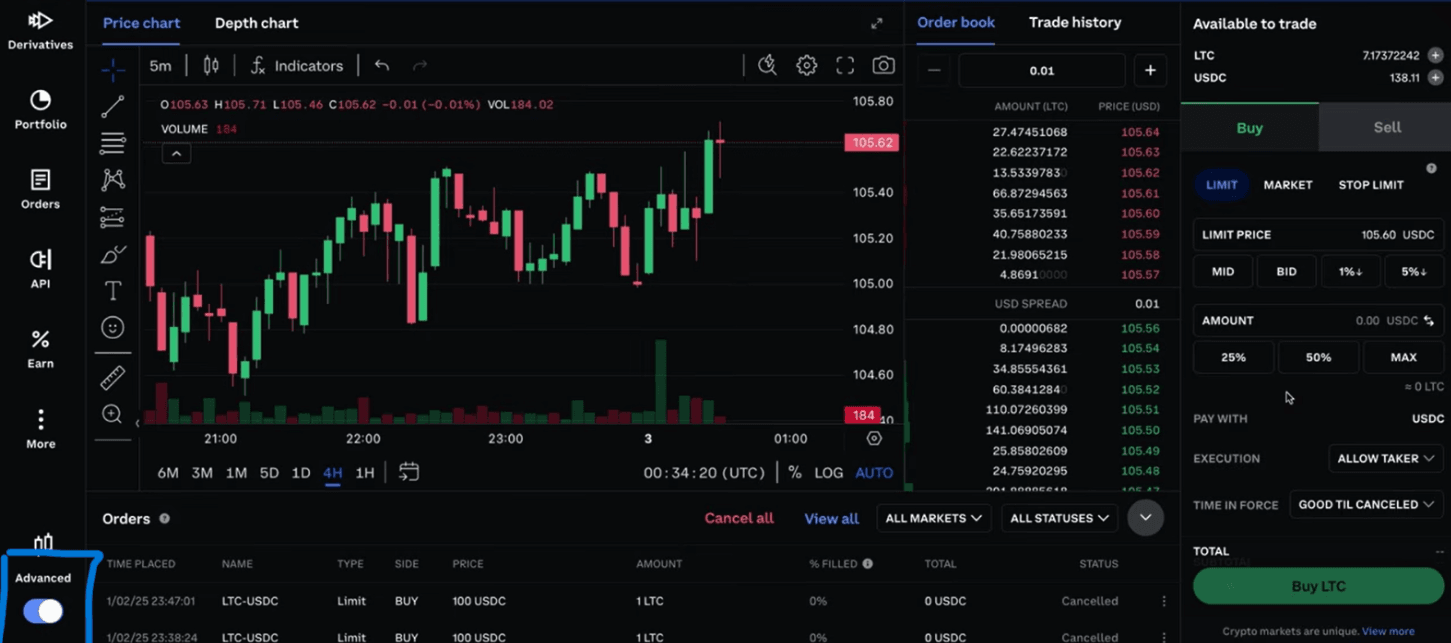
The best part is how seamless it is. You can instantly switch between the simple interface and the advanced trading view without transferring funds — it's the same wallet, the same login, just a more powerful mode.
What Can You Trade on Coinbase Advanced?
Coinbase Advanced gives you access to a deep selection of crypto markets with tight spreads and strong liquidity. You can trade $Bitcoin, $Ethereum, and 250+ altcoins with deep liquidity on all major pairs. Earlier figures from the platform put the number of available trading pairs even higher, with access to over 550 trading pairs with the same liquidity as the old Coinbase Pro.
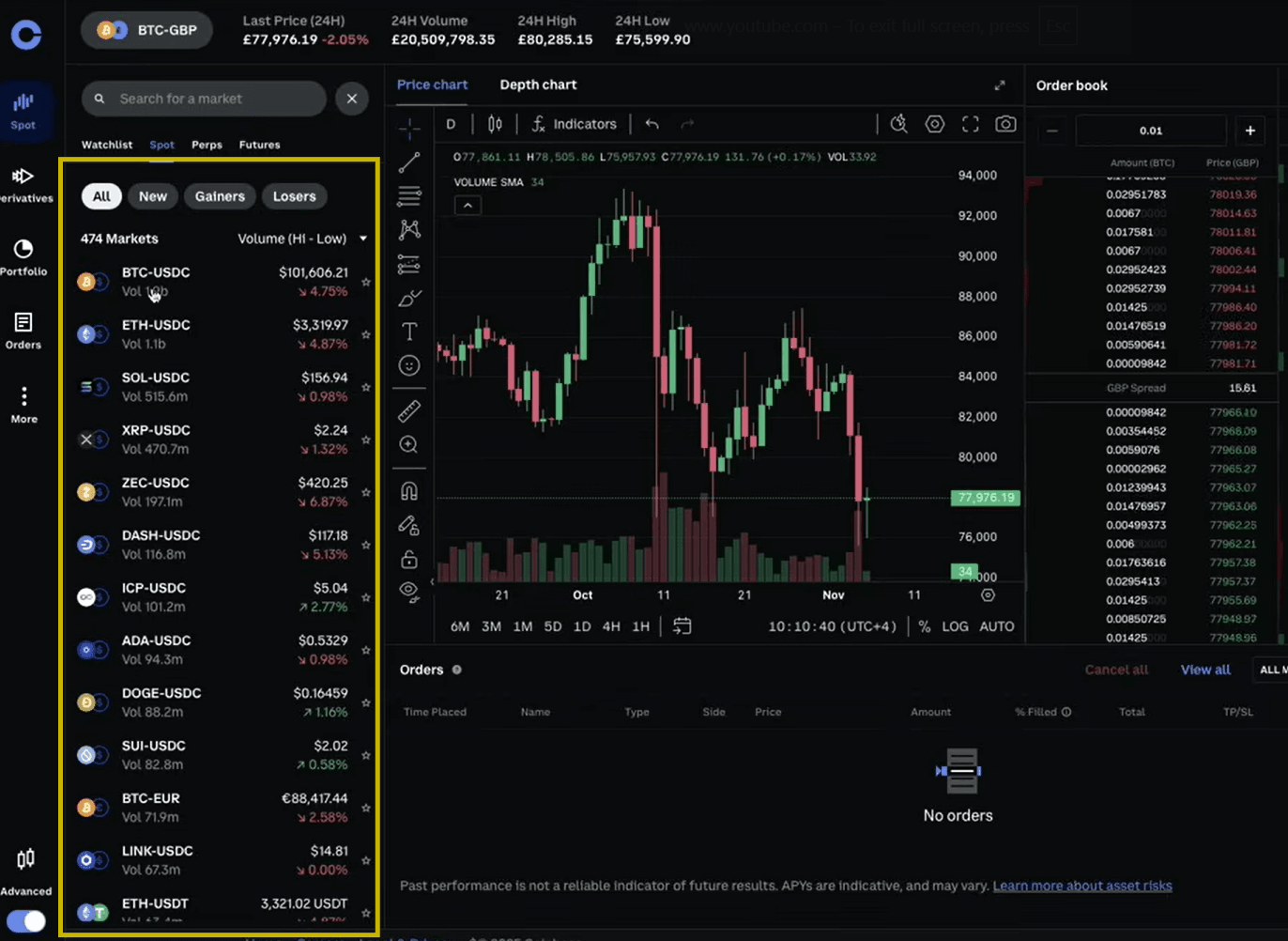
Beyond spot trading, Advanced connects to the wider Coinbase ecosystem. It offers enhanced tools like interactive charts powered by TradingView, advanced order types, and access to all the other features Coinbase offers, such as staking, Borrow, Card, and the dapp Wallet.
The platform is built for analysis and precision. The headline features include:
- Professional charting: Fully customizable TradingView charts with over 100 indicators such as moving averages, RSI, MACD, and Bollinger Bands.
- Live order book: A real-time view of buy and sell orders showing market depth and liquidity, so you can see exactly where the market sits before you trade.
- Multi-panel layout: A professional layout with real-time charts, order books, trade history, and portfolio management all on a single screen.
- Detailed trade history: Complete logs of executed trades with timestamps and fee breakdowns.
What Order Types Can You Use on Coinbase Advanced?
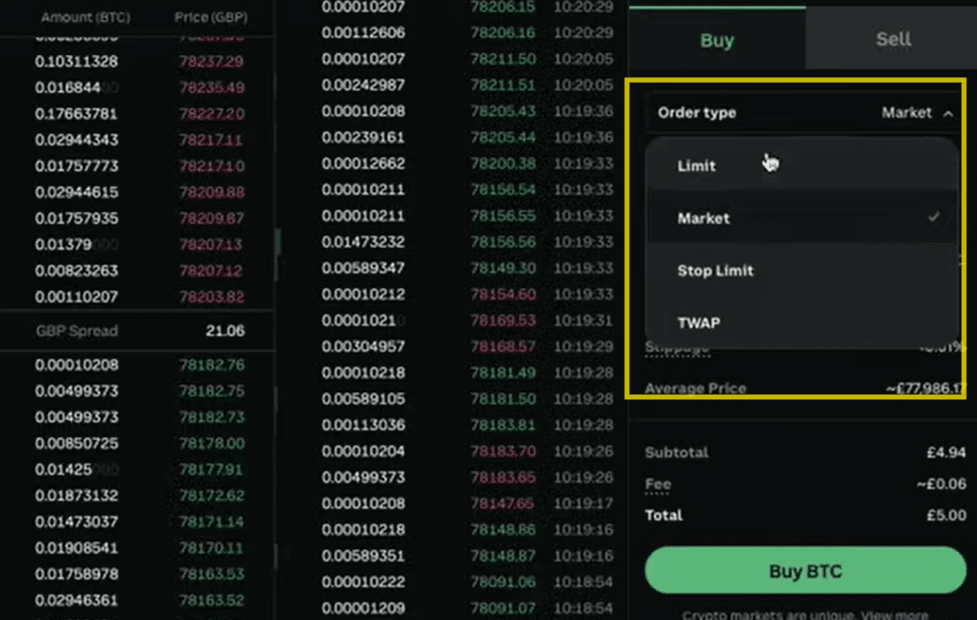
This is where Advanced separates itself from the standard interface. While standard Coinbase limits you to simple market buys and sells, Advanced Trade unlocks more sophisticated order types. The main ones are:
- Market orders: Buy or sell immediately at the current market price — the fastest, simplest option.
- Limit orders: Set the specific price at which you're willing to buy or sell, letting you target entry and exit points without constantly monitoring the market.
- Stop-limit orders: Automatically buy or sell once an asset hits a predefined threshold price, helping you manage risk exposure.
- Bracket orders: An advanced order that lets you set a limit price and a stop price simultaneously for an asset you already hold — useful for locking in profit and capping losses at once.
How Much Are Coinbase Advanced Fees?
Coinbase Advanced uses a maker-taker model that rewards higher trading volume. Fees range from 0.00% to 0.60% depending on your 30-day trading volume — and that's a major saving compared to the standard interface, where fees can run up to 4%, meaning savings of up to around 86%.
In simple terms, maker orders (limit orders that add liquidity to the book) carry lower fees than taker orders (market orders that remove liquidity). The more you trade over a rolling 30-day window, the lower your fee tier drops.
How Do You Get Started With Coinbase Advanced?
Getting started is straightforward, especially if you already have a Coinbase account.
- Open or log in to your Coinbase account. If you're new, sign up here and complete identity verification (KYC) — this is a standard regulatory step for any regulated exchange.
- Fund your account. Add funds via bank transfer, card, or by depositing crypto you already hold. The balance is shared with the standard interface, so there's nothing to move.
- Switch to Advanced. Use the toggle in the app or on Coinbase.com to open the Advanced trading terminal. You'll see the charts, order book, and order panel appear.
- Pick your market. Choose a trading pair, such as BTC-USD or ETH-USDC, and study the chart and order book.
- Place your first order. Start with a simple market or limit order. You can view or cancel open orders anytime by selecting Orders from the Advanced Trade tab, where you'll see all your orders across every market.
Is Coinbase Advanced Safe to Use?
Coinbase Advanced runs on the same security and regulatory backbone as the main platform. It uses 98% cold storage, carries a $280M insurance policy, is SEC regulated, and is operated by a publicly traded company (NASDAQ: COIN). For most users, that combination of regulation and security makes it one of the more trusted environments for active crypto trading.
Is Coinbase Advanced Worth It for Beginners?
Coinbase Advanced isn't a separate product to sign up for — it's a more capable mode of the account you already have. The standard interface stays perfect for quick, simple buys. But once you want real charts, precise order types, and meaningfully lower fees, Advanced gives you all of it without leaving Coinbase.
The interface looks more complex at first, but the core actions — pick a market, choose an order type, place the trade — are simple to learn. For anyone planning to trade more than occasionally, it's the smarter place to do it.
--------------------------------------------------------------------------------------
Disclaimers:
- Trading in crypto is highly risky and may not be suitable for all, as the entire amount invested could be lost.
- Information is provided for informational purposes only and is not investment advice. This is not a recommendation to buy or sell a particular digital asset or to employ a particular investment strategy.
- Coinbase offers simple and advanced trading in eligible jurisdictions. Advanced trading is for experienced traders and is subject to the Trading Rules. Fees on the two platforms vary; maker fees are based on volume.













 English (US) ·